This article demonstrates the use of Python’s cursor class methods fetchall(), fetchmany(), and fetchone() to retrieve rows from a database table. This article applies to all the relational databases, for example, SQLite, MySQL, PostgreSQL.
Also Read:
Python Database API Specification v2.0 (PEP 249) has been designed to encourage and maintain similarity between the Python modules used to access databases. So it doesn’t matter which database you use. Be it MySQL, PostgreSQL, and SQLite syntax, the syntax of functions and how to access the relational database are the same in all database modules.
We generally use the following Python module to work with Databases.
| Database | Module |
|---|---|
| MySQL | MySQL Connector Python |
| PostgreSQL | Psycopg2 |
| SQLite | sqlite3 |
Above all modules adhere to Python Database API Specification v2.0 (PEP 249).
This lesson will show how to use fetchall(), fetchmany(), and fetchone() to retrieve data from MySQL, PostgreSQL, SQLite database.
First understand what is the use of fetchall, fetchmany(), fetchone().
cursor.fetchall() fetches all the rows of a query result. It returns all the rows as a list of tuples. An empty list is returned if there is no record to fetch.
cursor.fetchmany(size) returns the number of rows specified by size argument. When called repeatedly, this method fetches the next set of rows of a query result and returns a list of tuples. If no more rows are available, it returns an empty list.
cursor.fetchone() method returns a single record or None if no more rows are available.
I have created a database_developers table in my database. Now, it contains five rows. let see how to use fetchall to fetch all the records.
Let see the examples now.
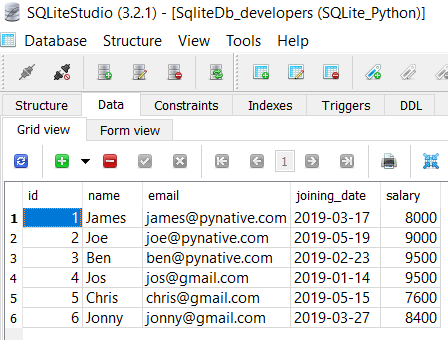
Table of contents
Fetch all rows from database table using cursor’s fetchall()
Now, let see how to use fetchall to fetch all the records. To fetch all rows from a database table, you need to follow these simple steps: –
- Create a database Connection from Python. Refer Python SQLite connection, Python MySQL connection, Python PostgreSQL connection.
- Define the SELECT query. Here you need to know the table and its column details.
- Execute the SELECT query using the
cursor.execute()method. - Get resultSet (all rows) from the cursor object using a
cursor.fetchall(). - Iterate over the ResultSet using
forloop and get column values of each row. - Close the Python database connection.
- Catch any SQL exceptions that may come up during the process.
Let try to fetch all rows from the table.
Output:
Connected to database
Total rows are:   5

Printing each row
Id:  1
Name:  Emma
Email:  emma@pynative.com
Salary:  12000.0


Id:  2
Name:  Scott
Email:  scott@pynative.com
Salary:  22000.0


Id:  3
Name:  Jessa
Email:  jessa@pynative.com
Salary:  18000.0


Id:  4
Name:  Mike
Email:  mike@pynative.com
Salary:  13000.0


Id:  5
Name:  Ricky
Email:  ricky@pynative.com
Salary:  19000.0


The Sqlite connection is closed
Also read:
Retrieve a few rows from a table using cursor.fetchmany(size)
One thing I like about Python DB API is the flexibility. In the real world, fetching all the rows at once may not be feasible. So Python DB API solves this problem by providing different versions of the fetch function of the Cursor class. The most commonly used version is the cursor.fetchmany(size).
The syntax of the cursor’s fetchmany()
rows = cursor.fetchmany([size=cursor.arraysize])Code language: Python (python)- Here size is the number of rows to be retrieved. This method fetches the next set of rows of a query result and returns a list of tuples. If no more rows are available, it returns an empty list.
- Cursor’s
fetchmany()method returns the number of rows specified by size argument. the default value is 1. If the specified size is 100, then it returns 100 rows.
Let try to fetch 3 rows from table using a cursor.fetchmany(size)
Output:
Connected to database
Fetching Total  3  rows
Printing each row

Id:  1
Name:  Emma
Email:  emma@pynative.com
Salary:  12000.0

Id:  2
Name:  Scott
Email:  scott@pynative.com
Salary:  22000.0

Id:  3
Name:  Jessa
Email:  jessa@pynative.com
Salary:  18000.0

The Sqlite connection is closed
Also read:
Note:
fetchmany()returns an empty list when no more rows are available in the table.- A
ProgrammingErrorraised if the previous call toexecute*()did not produce any result set or no call issued yet. fetchmany()returns fewer rows if the table contains the fewer number of rows specified by theSIZEargument.
What will happen if the cursor’s fetchmany(size) called repeatedly
What will happen if we called cursor.fetchmany(size) repeatedly after executing a SQL query.
For example, we ran a query, and it returned a query result of 10 rows. Next, we fetched the first two rows using cursor.fetchmany(2). Again, we called the cursor.fetchmany(2), then it will return the next two rows. Let see the example to understand it better.
Output:
Connected to database
Fetching Total  2  rows
Printing each row

Id:  1
Name:  Emma
Email:  emma@pynative.com
Salary:  12000.0


Id:  2
Name:  Scott
Email:  scott@pynative.com
Salary:  22000.0


Fetching next 2 rows from a table

Printing each row
Id:  3
Name:  Jessa
Email:  jessa@pynative.com
Salary:  18000.0


Id:  4
Name:  Mike
Email:  mike@pynative.com
Salary:  13000.0


The Sqlite connection is closed
Retrieve a single row from a table using cursor.fetchone
- Python DB API allows us to fetch only a single row. To fetch a single row from a result set we can use
cursor.fetchone(). This method returns a single tuple. - It can return a none if no rows are available in the resultset.
cursor.fetchone()increments the cursor position by one and return the next row.
Let see the example now.
Output:
Connected to database

Fetching single row
(1, 'Emma', 'emma@pynative.com', 12000.0)

Fetching next row
(2, 'Scott', 'scott@pynative.com', 22000.0)
The Sqlite connection is closed
Next Steps:
To practice what you learned in this article, Solve a Python SQLite Exercise project to practice database operations.

I’m trying to reteive the number of instances of a column value in a table in a MySQL database from a Python Flask Rest API like the following:
data = request.get_json()
exam_id = data.get(‘exam_id’)
sql = ‘SELECT count(ExamID) AS NumberOfQuestions FROM exams WHERE ExamID={}’.format(exam_id)
cursor.execute(sql)
NumberOfQuestions = cursor.fetchone()
result = [{‘NumberOfQuestion’: NumberOfQuestions}]
return jsonify({result})
but I get the following error:
{
“error”: “unhashable type: ‘list'”
}
But when I run this query in mysql “SELECT count(ExamID) FROM exams WHERE ExamID = 1;
it returns 3 as expected.
Could you offer any insight?
Quick question:
Why do you wait to close the cursor and connection until after your loop here:
connection = sqlite3.connect(‘SQLite_Python.db’)
cursor = connection.cursor()
print(“Connected to SQLite”)
sqlite_select_query = “””SELECT * from database_developers”””
cursor.execute(sqlite_select_query)
records = cursor.fetchall()
print(“Total rows are: “, len(records))
print(“Printing each row”)
for row in records:
print(“Id: “, row[0])
print(“Name: “, row[1])
print(“Email: “, row[2])
print(“Salary: “, row[3])
print(“\n”)
cursor.close()
Can’t you close the cursor and the connection before looping and printing, since you put the results in a local object?
Bilgi icin tesekkurler
Bir soru : mesela ben input da ismi yazarak 1 kisinin bilgilerine ulasmak istiyorum o zaman nasil olucak?
What if I do not want to fetch? What if I only need to know if a row exists?
thanks a lot for these TIPs.
You’re welcome, Ali.
is there a way to say only show let’s say Jessa Name and Email instead of all her values
I have a question for you. I normally get the result back with
Result = cursor.fetchone()[0]
I know that for I can do a check statement with if
Result == None(correct me if I am wrong here)But what if the column itself contains a null value? How do I check for that?
If
Result == Null?I am displaying one record performance. I tried to use the fetchone() and I am able to see the last record only. I cannot browse to other records. Can you help
Thanks for the tutorial.
There is a problem in the example.
You performed select * from ….
so according to the table structure you get 5 columns in the response. In the example you refer a 4 columns result_set.
Is it a mistake?
Is there an option to refer a column in the result_set by its name?
how can we fetch multiple-line sql error messages thrown by failed stored procedures? i am only able to return first row of error messages
Hello Vishal,
Thank you for this tutorial about fetching rows. It explains very well how to use it. My doubt is where the cursor store the result set when you perform a fetchall. Let’s say the query result os about 1000 rows. Python gets all those 1000 records and store them internally or somehow the cursor creates an index for the result set and presents the rows as you need them ? I am worried about performance with large data being transferred. Thanks a lot.
Is there an equivalent for this to get records from oracle table?
Good morning/afternoon/night, I have a problem with fetchall (), it does not receive any data, it prints ‘None’, ‘NoneType’ or “No result set to fetch form”. My queries are of the type like “SELECT name FROM Clients”.
A month ago it was working properly.
Please, I need a solution as soon as possible.
Same with fetchone and fetchmany 🙁
Hey, If you are getting
Noneit means your query is not returning any resultset. please check your table and queryWhat does the [0] mean in the fetchone()[0]?
It means the first column, of the row.
Hi Vishal, i have a challenge, my query extract has approximately 500K rows and cursor fetchall() is failing and no output is coming out kind of stuck, how do i overcome this. I need this data and i’m extracting to Excel and need to do some analytics/graphs
Hey Srini, You can use fetchmany() to fetch fewer rows. maybe you are facing timeout error as the query is taking time to return result
you have to read a row and access next, in this simple way:
And now the bottle-neck is your hard disk, not your RAM! 😉
Hi! Great info.. just a question. If record = cursor.fetchone() returns no row, I get the error “TypeError: cannot unpack non-iterable NoneType object”. I tried validating it with ‘ if cursor:’ however it does not work. How would you check if the fecthone() returns a row, in order to print the row or a message “no info available”? Thanks!
The
cursor.fetchone()method to retrieve the next row of a query result set.This method returns a single record or None if no more rows are available. Just simply do this.
row = cursor.fetchone()
if row is not None:
    # print record