Object-oriented programming (OOP) is a programming paradigm based on the concept of “objects”. The object contains both data and code: Data in the form of properties (often known as attributes), and code, in the form of methods (actions object can perform).
In this lesson, you will learn about OOP (Object Oriented Programming) in Python. OOP concepts include object, classes, constructor and encapsulation, polymorphism, and inheritance.
Also See
An object-oriented paradigm is to design the program using classes and objects. Python programming language supports different programming approaches like functional programming, modular programming. One of the popular approaches is object-oriented programming (OOP) to solve a programming problem is by creating objects
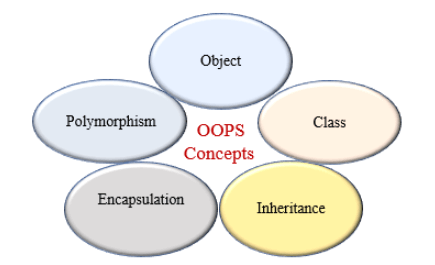
Table of contents
Class
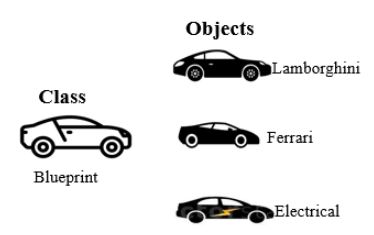
In Python, everything is an object. A class is a blueprint for the object. To create an object we require a model or plan or blueprint which is nothing but class.
For example, developing a building according to the building plan. The plan contains all dimensions and structure. Based on these descriptions, we can construct a building. Here, a building is an object.
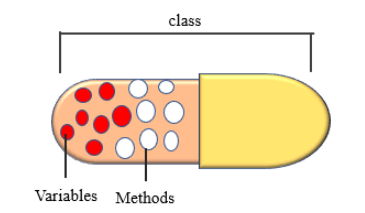
Class to represent the properties (attribute) and action (behavior) of the object. Properties represent variables, and actions are represented by the methods. Hence class contains both variables and methods.
Creating Class
In Python, create a class by using the keyword class. In the class definition, the first string is docstring which, is a brief description of the class.
The docstring is not mandatory but recommended to use. We can get docstring using __doc__ attribute. Use the following syntax to create a class.
Syntax
class classname:
    '''documentation string'''
class_suiteCode language: Python (python)- Documentation string: represent a description of the
class. It is optional. - class_suite:
classsuite contains component statements, variables, methods, functions, attributes.
Object
The physical existence of a class is nothing but an object. In other words, the object is an entity that has a state and behavior. It may be any real-world object like the mouse, keyboard, laptop, etc.
Creating object
We can create any number of objects for class. Below is the syntax used to create an object.
Syntax:
reference_variable = classname()Code language: Python (python)Example: Creating Class and Object in Python
In the above example, we created a Class with the name Student. Also, we created an object stud.
With help of class objects, we can access class methods. Here we accessing the learn() method by using the stud object.
Instance Variables and Methods
If the value of a variable varies from object to object, then such variables are called instance variables. For every object, a separate copy of the instance variable will be created.
When we create classes in Python, instance methods are used regularly. we need to create an object to execute the block of code or action defined in the instance method.
We can access the instance variable and methods using the object. Use dot (.) operator to access instance variables and methods.
In Python, working with an instance variable and method, we use the self keyword. When we use the self keyword as a parameter to a method or with a variable name is called the instance itself.
Note: Instance variables are used within the instance method
Example
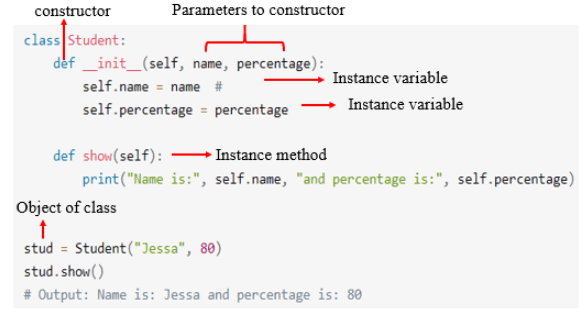
In the above example, name and percentage are instance variables, and these variables get initialized when we create an object for the Student class. Here, the show() method is an instance method. If we want to call that method we need to create an object of the class.
Constructors in Python
In Python, a constructor is a special type of method used to initialize the object of a Class. The constructor will be executed automatically when the object is created. If we create three objects, the constructor is called three times and initialize each object.
The main purpose of the constructor is to declare and initialize instance variables. It can take at least one argument that is self. The __init()__ method is called the constructor in Python. In other words, the name of the constructor should be __init__(self).
A constructor is optional, and if we do not provide any constructor, then Python provides the default constructor. Every class in Python has a constructor, but it’s not required to define it.
We have two types of constructors in Python.
- Non-parameterized: The constructors in Python which have no parameter is known as a non parameterized constructor. The non-parameterized constructor uses when we do not want to manipulate the value or the constructor that has only self as an argument.
- Parameterized Constructor: The constructor with parameters is known as a parameterized constructor. The parameterized constructor has multiple parameters along with the
self.
Example: Constructor without parameters (Non-parameterized)
Example: Constructor with parameters
In the above example, we create a parameterized constructor with parameters name and color. When we create an object of Test class called obj, the parameterized constructor will be executed automatically.
The self Parameter
The self is used to represent the instance of the class. It is the default variable that is always pointing to the current object.
By using self, we can access the instance variable and instance method of the object. While defining constructor and instance method, the self is their first parameter.
It’s not required the first parameter named to be self, we can give any name whatever we like, but it has to be the first parameter of any function in the class.
Example
In the above example, all methods including __init__ have a self parameter. We created two instance variables id and name. Then we create an object of a class Employee called emp and accessed instance methods of the class called info() and department() respectively.
Class Variable
A class variable is a variable that is declared inside of class, but outside of any class method, they are not defined inside any class method.
Only one copy of the class variable will be created and shared by all objects of a class. Class variables are not used as frequently as instance variables.
A class variable alone looks like this:
We can access class variables either by class name or object reference but recommended to use the class name.
Example
In the above example, we declare a Class variable called the department. Also, we created an instance of Employee Class and print class variable using a class name with dot notation.
Object Properties
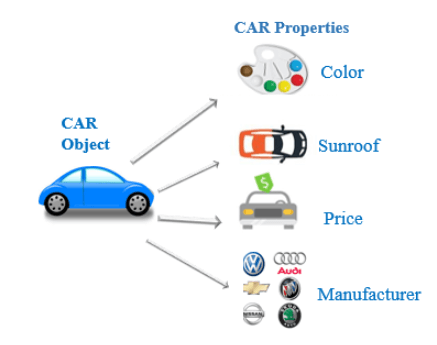
Every object has properties with it. In other words, we can say that object property is an association between name and value.
For example, a car is an object, and its properties are car color, sunroof, price, manufacture, model, engine, and so on. Here, color is the name and red is the value.
Modify Object Properties
Every object has properties associated with them. We can set or modify the object’s properties after object initialization by calling the property directly using the dot operator.
Example
Delete object properties
We can delete the object property by using the del keyword. After deleting it, if we try to access it, we will get an error.
In the above example, As we can see, the attribute name has been deleted when we try to print or access that attribute gets an error message.
Delete Objects
In Python, we can also delete the object by using a del keyword. An object can be anything like, class object, list, tuple, set, etc.
Syntax
del object_nameCode language: Python (python)Example : Deleteing object
In the above example, we create the object emp of the class Employee. After that, using the del keyword, we deleted that object.
Encapsulation
In Python, encapsulation is a method of wrapping data and functions into a single entity. For example, A class encapsulates all the data ( methods and variables). Encapsulation means the internal representation of an object is generally hidden from outside of the object’s definition.
Need of Encapsulation
Encapsulation acts as a protective layer. We can restrict access to methods and variables from outside, and It can prevent the data from being modified by accidental or unauthorized modification. Encapsulation provides security by hiding the data from the outside world.
In Python, we do not have access modifiers directly, such as public, private, and protected. But we can achieve encapsulation by using single prefix underscore and double underscore to control access of variable and method within the Python program.
See the following example where we have implement encapsulation.
Example
In the above example, we create a class called Employee. Within that class, we declare two variables name and __salary. We can observe that the name variable is accessible, but __salary is the private variable. We cannot access it from outside of class. If we try to access it, we will get an error
Polymorphism
Polymorphism is taken from the Greek words Poly (many) and morphism (forms). Polymorphism defines the ability to take different forms.
For example, The student can act as a student in college, act as a player on the ground, and as a daughter/brother in the home. Another example in the programming language, the + operator, acts as a concatenation and arithmetic addition.
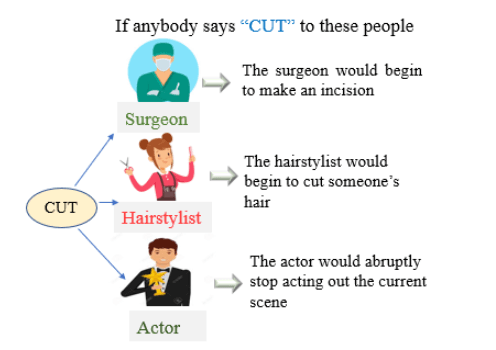
In Python, polymorphism allows us to define the child class methods with the same name as defined in the parent class.
Example
In the above example, we created two classes called Circle and Rectangle. In both classes, we created the same method with the name calculate_area. This method acts differently in both classes. In the case of the Circle class, it calculates the area of the circle, whereas, in the case of a Rectangle class, it calculates the area of a rectangle.
Inheritance
In an Object-oriented programming language, inheritance is an important aspect. The main purpose of inheritance is the reusability of code because we can use the existing class to create a new class instead of creating it from scratch.
In Python, inheritance is the process of inheriting the properties of the parent class into a child class.
In inheritance, the child class acquires and access all the data members, properties, and functions from the parent class. Also, a child class can also provide its specific implementation to the functions of the parent class.
Use of inheritance
To create classes that are built upon existing classes called reusability. So, we do not have to write the same code again and again.
Syntax
class BaseClass:
  Body of base class
class DerivedClass(BaseClass):
  Body of derived classCode language: Python (python)
Example
Output:
We are in base class
We are in child class
In the above example, we create two classes called ClassOne and ClassTwo.The ClassTwo is derived from ClassOne that is the base class. While calling functions, create an object of child class called obj and called with the help of that object, that is, obj.func1.

Loved it, thank you for sharing 🙂
Outstanding work
Thank you, Hermpy